Start here · Beginner · 5 lessons, about 45 minutes in total
AI for beginners: start here
What AI chat tools like ChatGPT and Claude are, what they get wrong, and how to use one safely. You’ll make a free account, have your first conversation, learn to check what it tells you, and then finish by making something useful for your week.

What you build
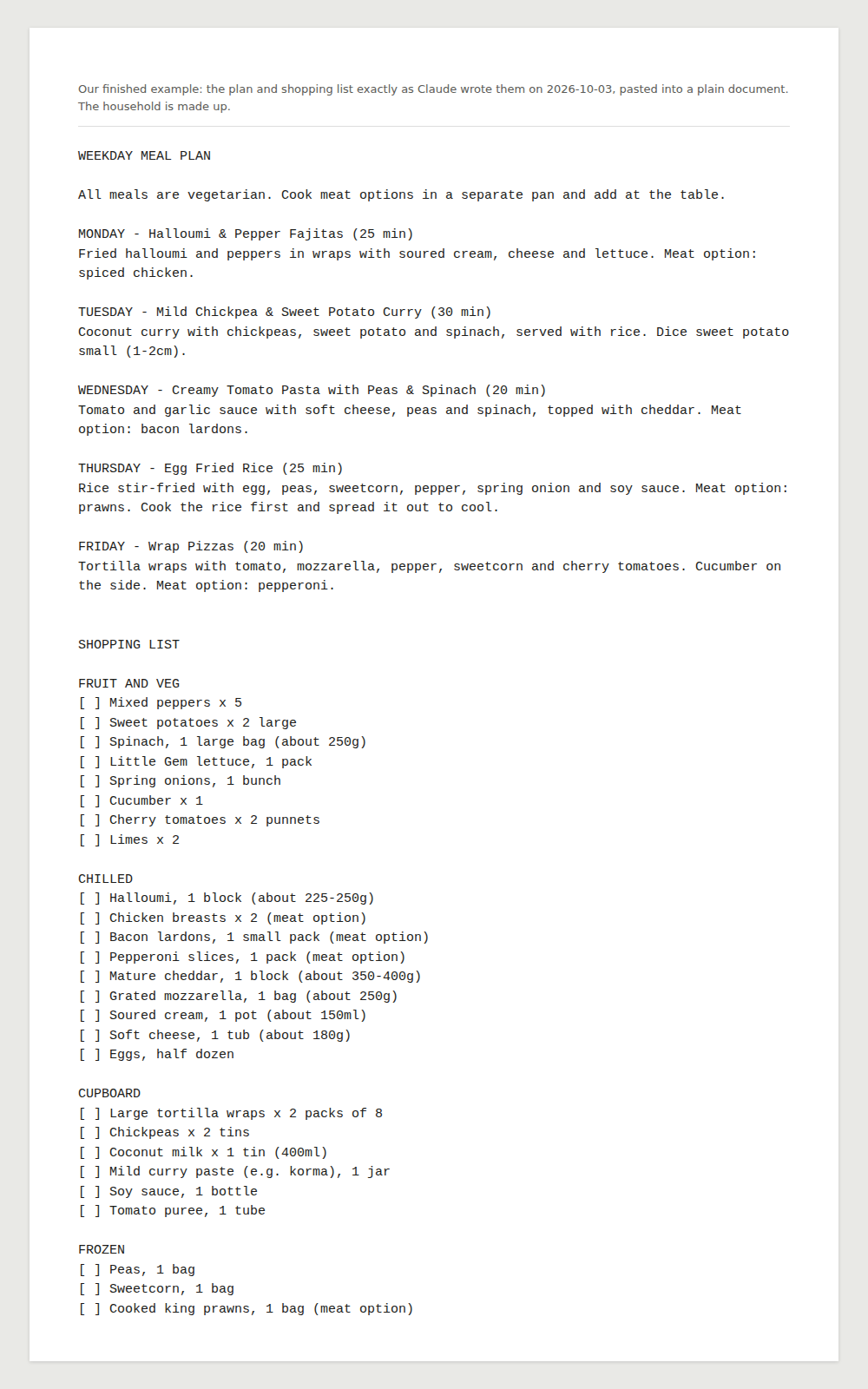
A week of evening meals and one shopping list for your household, made with an AI chat tool, checked by you, and saved as a document you can print or keep on your phone. Our worked example is a made-up household of two adults and two children, one of them vegetarian.
Fictional example household
The household is made up. The plan and shopping list are exactly what Claude wrote for our prompt, pasted into a plain document.
Not for: People who already use AI chat every week. Try “Prompting for beginners” instead.
Before you start
- Time
- 5 lessons, about 45 minutes in total
- Level
- Beginner
- Cost
- Free.
- Certificate
- Certificate of completion, with its own verification link
Tools and what they cost
- Claude (Free plan)Free
- ChatGPT (Free plan)Free
What you need
- A computer, tablet or phone with a web browser
- An email address, if you want a free account (you can try ChatGPT without one)
- No technical knowledge
- A notes app, word processor or email draft to save what you make in lesson 5 (one already on your device is fine)
Who it’s for
- Anyone who has never used an AI chat tool
- People who tried one once and didn’t know what to do with it
- Anyone who wants to know what’s safe to type in before they start
The lessons
Module 1
Meet AI chat tools
Module badge: Signed up and safe
Module 2
Use it well
Module badge: First real job done
At the end
Finish all 5 lessons and you’ll get a certificate of completion, with its own verification link and an “Add certificate to LinkedIn profile” button.
Completion is self-reported: we do not check what you make. It is not an exam result, a qualification or an accreditation. How certificates work.
Questions about this course
Do I have to pay for anything?
No. ChatGPT and Claude both have free plans that cover every lesson.
Should I use ChatGPT or Claude?
Either. The lessons work the same in both. Our examples were made with Claude, so your replies won’t match ours, whichever you choose.
Can I do this course on my phone?
Yes. Both tools work in a phone’s web browser, and the lessons are short. Lesson 5 is easier if you can print, but you can just keep the plan on your phone instead.
Is it safe to type personal things into an AI chat?
Treat it like something other people may read. Don’t type bank or card details, health records, passwords or confidential documents. Lesson 1 explains why, and lesson 2 shows you the privacy settings.
Will the AI give me the same answers as yours?
No. AI tools give a different answer each time, so what should match is the shape: a plan, a list, and the things to check.
Sources, checked 3 October 2026
- Claude: Plans and pricing
- Claude Help Center: Get started with Claude (access, the 18+ age requirement, Free plan usage limits)
- Claude Help Center: Claude is providing incorrect or misleading responses
- Claude Help Center: Claude is producing links that don’t work and falsely claiming it has sent emails
- Claude Help Center: Who can view my conversations? (be mindful about sensitive information)
- Anthropic Privacy Center: How do I change my model improvement privacy settings?
- Anthropic Privacy Center: Is my data used for model training?
- Claude Help Center: Use incognito chats
- Claude Platform Docs: Reduce hallucinations
- ChatGPT: Pricing
- OpenAI Help Center: What is ChatGPT? (free to use; you own the output)
- OpenAI Help Center: Does ChatGPT tell the truth?
- OpenAI Help Center: Data controls in ChatGPT
- OpenAI Help Center: Is ChatGPT safe for all ages? (13+, parental consent 13 to 18)
- OpenAI Help Center: How do I create a good prompt for an AI model?
- ChatGPT: Log in or sign up page
- ChatGPT: front page (usable without signing in)
- GOV.UK: UK bank holidays
- Vegetarian Society: Which cheeses are suitable for vegetarians, and which aren’t?